How to disable activity logging
Cinemata is a privacy-focused platform, and we value your right to control your own data. By default, Cinemata can record your activity on the platform, such as the videos you watch. Turning this off stops your activity from being logged, giving you more privacy, especially if you’re viewing sensitive or censored content.
You need to be logged in to disable activity logging. If you need help with this, click here to view our login guide. Once logged in, follow the steps below.
- Go to My Profile. You may click on your avatar at the right side of the top menu bar which will open a dropdown sub-menu. Click on the first item showing your username or My Profile. If your side bar is open, you may also click on the My Profile button.
- On the right side of the website, below your banner, you will see two buttons: Edit Profile and Delete Account.
- Click Edit Profile.
- Scroll down until you see the option for Disable Activity Logging. Ensure the box is checked.
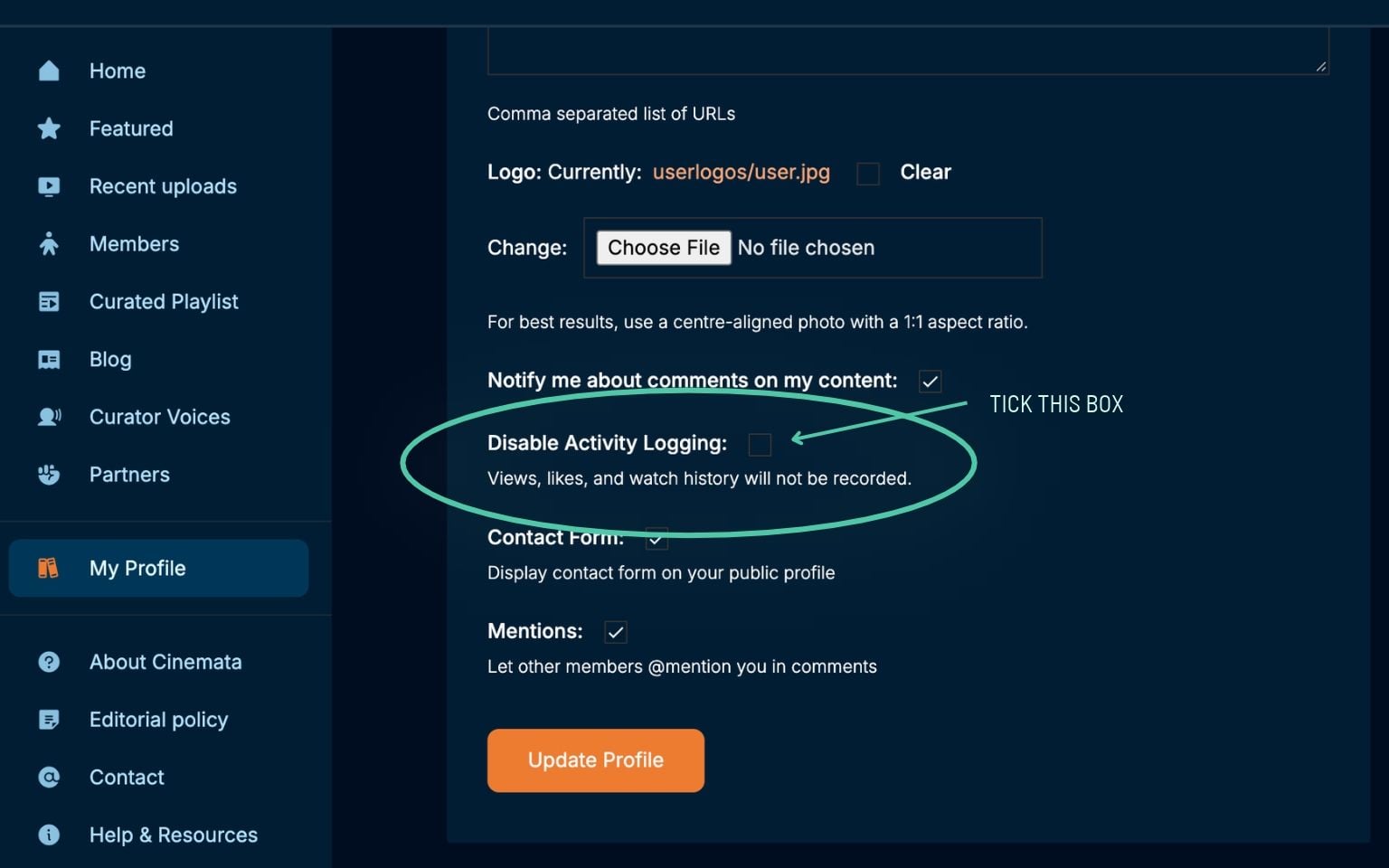
- Click Update Profile to save your preferences.
You can turn activity logging back on at any time by following the same steps, so you’re always in control of your privacy on Cinemata.